Extract structured information
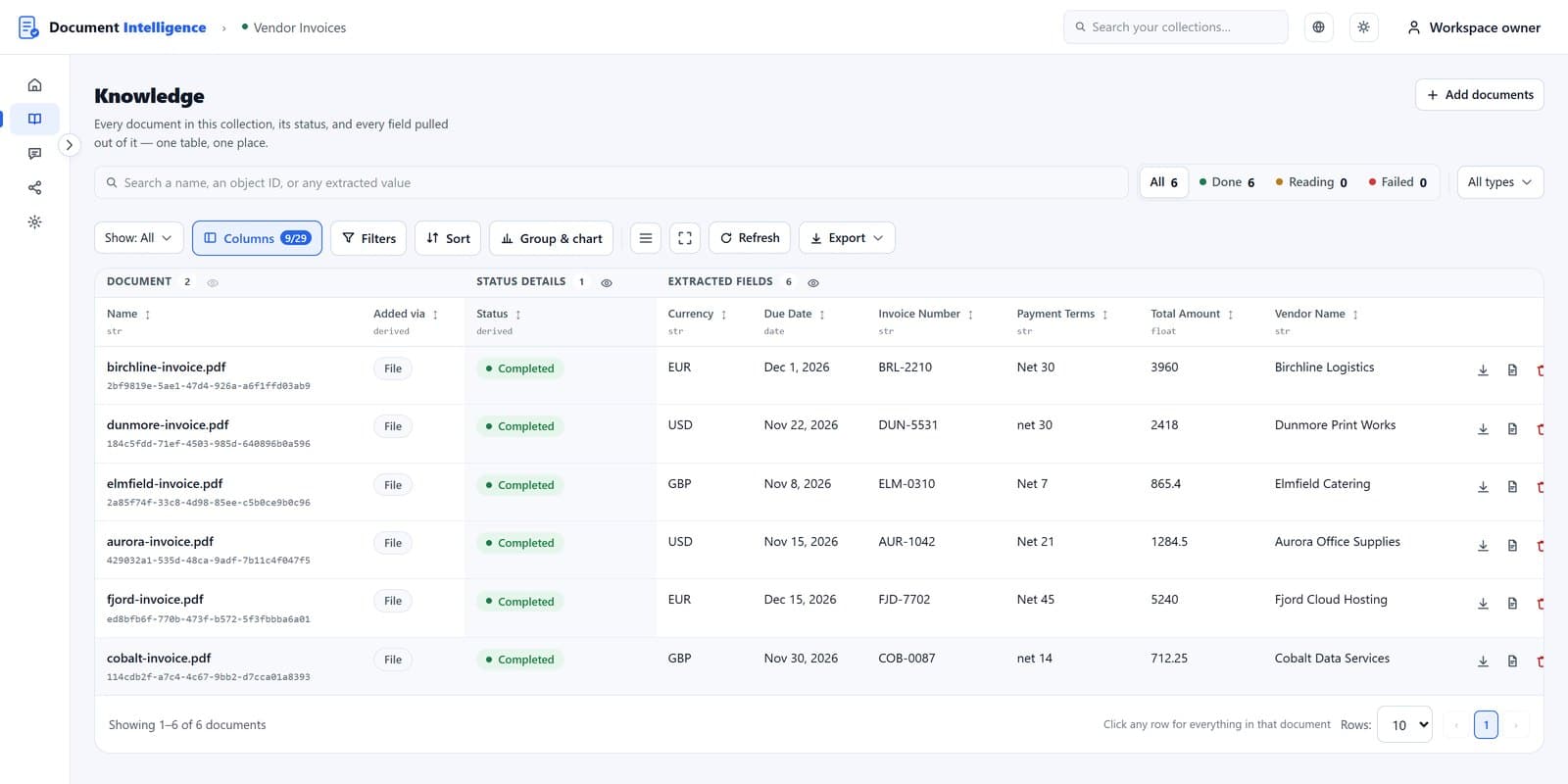
Define the fields you want to extract, including their types and descriptions. Process documents and inspect the extracted values in a structured table you can search, sort and filter.
Upload documents, extract structured information into tables, organize your knowledge, and ask questions across your documents.
An open-source Document Intelligence application built by FutureSmart AI. A complete, opinionated reference application that you can try, self-host, customize, or integrate through APIs.
How it works
Document Intelligence helps you work with information stored across documents.
Create a collection, upload documents, define the fields you want to extract, and explore the results in a structured table.
You can also inspect individual documents, explore their extracted information, and ask questions across your collection using RAG.
Features
Define the fields you want to extract, including their types and descriptions. Process documents and inspect the extracted values in a structured table you can search, sort and filter.
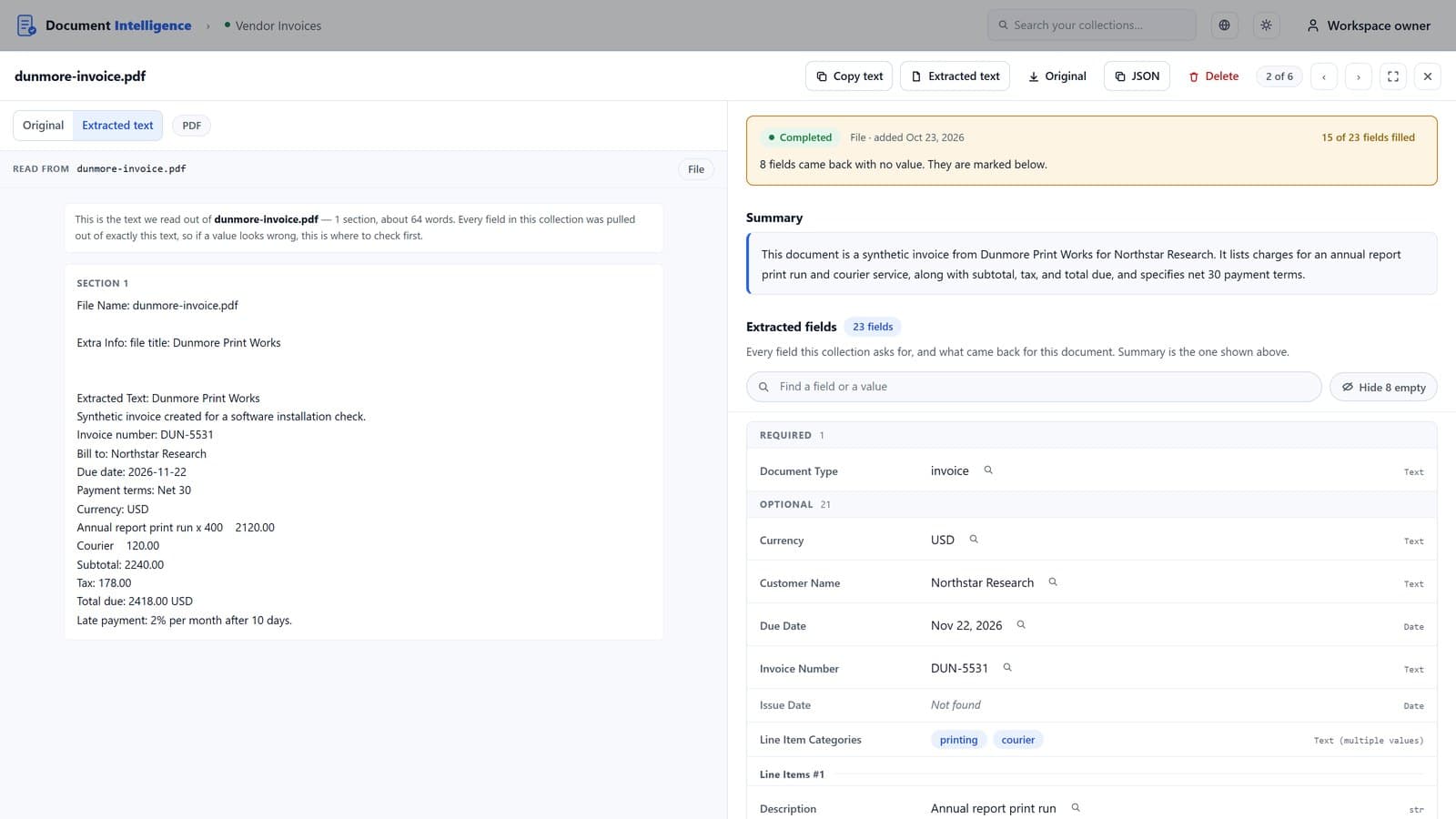
Create collections to manage related documents. Use the Knowledge View to inspect document content, summaries, and extracted fields in one place.
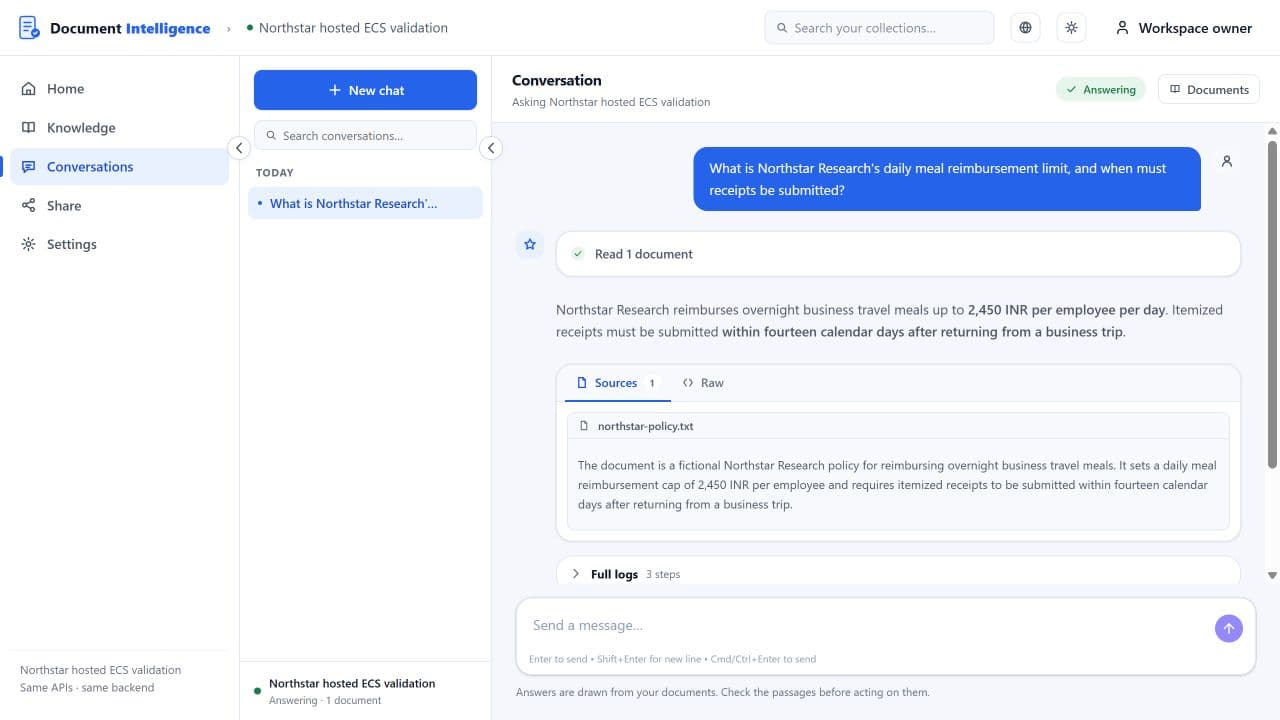
Ask questions about your collection or selected documents and receive answers grounded in the available information. Inspect the documents used to produce each answer. The search API also returns the matching passages for applications that need more detailed retrieval results.
Upload PDF, Word (DOCX), plain text, Markdown and MP3 audio files, add web pages by URL, or paste text. PDF and Word files can be up to 10 pages each. Some processing modes and external integrations require additional configuration.
Download extraction results as CSV — the rows and columns you are looking at, or everything — and use them in spreadsheets or other applications.
Work through the web application, or integrate document ingestion, search, and question answering through the documented APIs.
UI or API
Work directly in the web application, or add documents, search them, and ask questions from your own software through the documented API.
Takes in
Reach it from
Replace YOUR_COLLECTION_IDwith your collection’s ID (copy it from the collection card) and <YOUR_API_KEY> with a key generated under Share → API— a Document Intelligence key, not an OpenAI key. Keep it on your server and treat it like a password. A self-hosted install serves the same routes from its own API root.
import requests

r = requests.post(
    "https://futuresmart.ai/document-intelligence/api/v1/YOUR_COLLECTION_ID/chat",
    headers={"x-api-key": "<YOUR_API_KEY>"},
    json={"query": "Which invoices are due before December?",
          "stream": False},
    timeout=120,
)
d = r.json()
print(d["response"])

for source in d["data"]["knowledge"]["relevant_sources"]["data"]:
    print(source["title"])
Open source
Document Intelligence is a complete reference application, not just a document parsing or RAG library.
The repository includes the web interface, backend, ingestion and indexing workers, structured extraction, knowledge retrieval, model configuration, evaluation tools, and deployment instructions.
You can inspect the architecture, deploy it in your own environment, customize its behavior, and extend it for your requirements.
The default standalone installation uses one OpenAI API key. Additional processing integrations can be configured when needed.
In the repository
Apache-2.0 · Docker Compose · FastAPI and Next.js
Research
At AI Demos, we benchmark AI products against real-world scenarios, capture their actual outputs, review the evidence, and publish what works and what fails.
We use findings from the Structured Document Extraction and Managed RAG benchmarks to understand Document Intelligence’s capabilities, identify limitations, and guide improvements.
Our public GitHub repository documents engineering decisions, fixes, verification results, and ongoing work so people can see how the product evolves.
Get started
Open Document Intelligence through FutureSmart AI’s hosted application.
Sign in, create a document collection, upload your documents, and explore structured extraction, Knowledge View, and question answering.
The hosted service provides platform-funded usage subject to account limits: a new account starts on the Trial plan, with up to 10 collections, 50 documents and 50 questions a day. Your allowance is shown under Usage → Limits. Optional model-provider credentials can also be configured.
Prefer to host it yourself?
Clone the open-source repository, configure your OpenAI API key, and start the application using Docker Compose.
The repository includes sample documents, installation instructions, architecture documentation, and an API example.
Turn documents into structured, searchable information using the hosted application, or inspect and customize the open-source implementation.
Built by FutureSmart AI. Open source under Apache-2.0.